

 Disability is part of being human, and an estimated 1.3 billion people – around 16% of the global population currently experience significant disability. This number is increasing due to population aging and rising rates of chronic health conditions, among other causes.
Disability is highly diverse and represents one of the most significant barriers to education worldwide. It includes a range of issues related to human functioning, such as activity limitations, and participation restrictions. However, the challenges people face are not solely due to individual disabilities; rather, they often arise from environments that are not designed to be accessible. When accessibility is considered, learning can become more inclusive for everyone.
The United Nations (UN) Convention on the Rights of Persons with Disabilities (CRPD) highlights the importance of accessibility and the use of technology to enable full participation. Accessibility is essential for independent living and full participation in society, including access to transportation, communication, information, education, and public services.
Accessibility, therefore, means ensuring that everyone can access and use environments, services, products, and information safely, independently, and equally. In education, this involves removing barriers in both physical and digital materials, as well as in teaching methods and assessments. It is about designing systems, content, and activities in ways that allow everyone to participate and learn on equal terms.
Understanding physical and digital accessibility
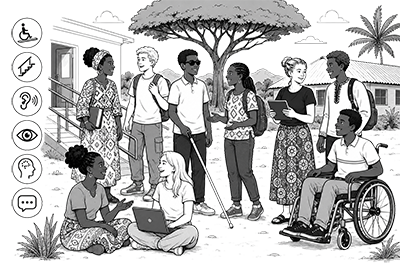
Physical accessibility refers to accessibility in the physical world. It includes the planning, construction, and maintenance of buildings and environments while considering:
- Mobility
- Seeing
- Hearing
- Understanding
- Communication
Examples include ramps, elevators, accessible toilets, clear signage, lighting, and classroom layouts.
Digital accessibility means that everyone can use websites, online services, digital materials, and learning platforms.
It also includes those using assistive technologies such as:
- Screen readers
- Voice control
- Captions
- Keyboard navigation
- Magnification tools
Accessible digital services should allow all users to perceive, understand, navigate, and interact with content effectively.
WCAG and the POUR principles
The Web Content Accessibility Guidelines (WCAG) provide a comprehensive framework for digital accessibility. It is widely adopted as the foundation for most international accessibility regulations, such as the European Union Directive (EU) 2016/2102 on the accessibility of websites and mobile applications.
The WCAG guidelines and success criteria are organized around the four principles (POUR):
- Perceivable: Information can be seen or heard
- Operable: Interfaces can be used and navigated
- Understandable: Content and navigation are clear
- Robust: Content works with different technologies
Accessibility depends on context and is a continuous process
Perfect accessibility is partially a myth because people have diverse needs. For example, website compliance with WCAG does not necessarily mean equal accessibility. Different people have different needs depending on their abilities, environments, devices, and situations. When it comes to learning, some people are hands-on, visual, or auditory learners, which means we have to present information in multiple ways to ensure it is equally accessible.
However, still creating an accessible website means complying with WCAG. Accessibility is essential for some people, but beneficial for everyone. For example, subtitles help people with hearing disabilities, but they are also useful in noisy environments, when watching videos silently, or for language support.
Products, spaces, services, and systems should be designed to reduce as many barriers as possible and focus on abilities throughout the design process. Many different practices and approaches can support a wide range of learners and improve accessibility for everyone. For example, Design for All is an inclusive approach that caters to the needs of all users, whatever their abilities or disabilities. It aims to remove barriers and offer equal access to everyone. Overall, the goal in accessibility is continuous improvement and reducing barriers whenever possible.
Attitudes are part of the environment
Accessibility is usually discussed in relation to buildings, documents and devices. But at the end of the day the key focus should always be on the person on the receiving end.
The Convention on the Rights of Persons with Disabilities treats this directly. Article 8 obliges states to take immediate, effective and appropriate measures to raise awareness throughout society, to combat stereotypes and prejudices, and to promote awareness of the capabilities and contributions of persons with disabilities. It names fostering respect at all levels of the education system as one of those measures. People with disabilities are not asking for special treatment, they are asking for access.
Unfortunately Attitudinal barriers compound physical ones as they run along side them and make them worse. A ramp that exists but is used for storage is an attitude problem wearing a building’s clothes.
A barrier made of assumptions is still a barrier, and it costs nothing to remove except attention.
Assumptions and Misconceptions
A systematic review of disability stigma in sub-Saharan Africa found that misconceptions about the causes of impairment are the most common driver, with an important qualification: knowledge and belief coexist rather than one replacing the other. In one study, 94% of people knew about epilepsy while one in five thought disease was caused by ancestors’ sins. So stigma is not simply a lack of information, and information alone does not remove it.
What changes attitudes
The obvious answers are not the effective ones. Disability simulation exercises, such as blindfolding staff or using a wheelchair for a day, have been found to leave participants judging disabled people as less capable than before, because they capture the difficulty of a first attempt and miss the skill people build over years. What does work is sustained contact combined with training, and institutional arrangements that make inclusion normal. One-off awareness sessions have weak and short-lived effects.
How to meet different persons covers this evidence and the practical guidance that follows from it.
Checklist and practices
- Consider both physical accessibility and digital accessibility
- Follow WCAG guidelines and the POUR principles
- Consider different users, abilities, and contexts
- Reduce barriers whenever possible
- Ensure compatibility with assistive technologies
- Design inclusive learning environments
- Remember that accessibility benefits everyone
- Keep improving accessibility continuously
- Treat attitudes as part of the environment, alongside buildings and technology
- Involve disabled staff and students as colleagues and teachers, not only as examples
- Avoid disability simulation exercises
- Combine training with sustained contact and back it with policy
- Check that accessible features are actually usable, not blocked or unused
Links and references
- Accessibility Standards Overview (W3C website)
- Convention on the Rights of Persons with Disabilities (CRPD) (UN website)
- Design for All (IxDF website)
- Digital inclusion in Europe (EU website)
- Disability fact sheet (WHO website)
- General information about accessibility (the Finnish Transport and Communications Agency Traficom website)
- Inclusive education (UNICEF website)
- Making the Web Accessible (W3C website)
- Web Content Accessibility Guidelines (WCAG) (W3C website)
Next page: Inclusive pedagogy and education for all