


Procuring assistive technology (AT) is not the same as purchasing routine school supplies. Assistive technologies are not simply products — they are solutions designed to support specific learners, in specific learning environments, for specific educational tasks.
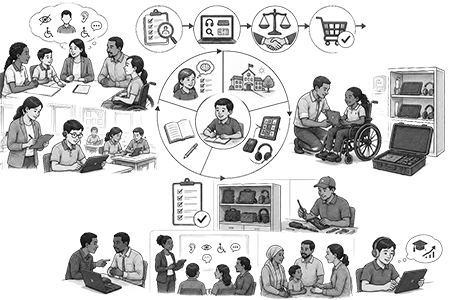
Successful procurement requires planning, collaboration, and long-term thinking. Without careful assessment and stakeholder involvement, schools may purchase devices that are unsuitable, difficult to maintain, or rarely used.
Research and practical experience show that many AT projects fail not because the technologies are ineffective, but because schools skip the planning process and move directly to purchasing devices.
Good procurement focuses on:
- Learner needs
- Educational participation
- Sustainability
- Accessibility
- Long-term usability
- Local context
Frameworks
Assessing a learner’s AT needs is one part of a wider service process, and there are different approaches and frameworks, such as SETT or HAAT, to support the selection, provision, and implementation of AT. These approaches should be adapted to fit the specific context, the professionals involved, and the sector in which they are applied. The SETT framework originates in the field of education and is therefore considered more closely aligned with the requirements for examining AT in educational settings.
SETT – Starting with the learner
SETT stands for Student, Environment, Tasks, and Tools. The idea is that, before you ever look at a catalog, answer questions ”who” (student’s characteristics), the ”where” (learning environment characteristics), and the ”what” (tasks that a student needs to be able to do).
This understanding helps select kinds of supports (tools) that could be helpful. So, the framework encourages schools and educators to first understand the learner and learning context before selecting technologies, and helps avoid purchasing expensive technologies that later remain unused.
Student
Who is the learner? What can they already do? What do they struggle with?
Consider:
- Strengths and abilities
- Challenges and support needs
- Communication preferences
- Learning goals
- Environment
Environment
Where will the tool be used? Classroom, home, playground?
Consider:
- Classroom conditions
- Electricity and internet availability
- Dust, heat, and weather
- Home and community environments
Tasks
What exactly does the learner need to do?
Examples:
- Read textbooks
- Participate in classroom discussions
- Complete examinations
- Access digital content
Tools
Only after understanding the learner, the environment, and the tasks should schools evaluate potential technologies.
HAAT – Understanding the whole AT context
HAAT stands for the Human, Activity and Assistive Technology interacting within a context. The idea is that assistive technology works best when all four components are considered together.
- Human: The person’s abilities, needs, preferences, and experience with technology (physical, cognitive, sensory, attitudinal
characteristics). - Activity: What the person wants or needs to do, and why it matters (type and personal meaning, why and how, time and frequency).
- Assistive Technology: The technology and its interfaces, and how the person interacts with it (human-technology interaction, interface, processing, activity outcome).
- Context: Environment including physical, social, and institutional factors.
The framework highlights that effective AT use depends on the interaction between the person, the activity, the technology, and the context, not just the technology itself.
Identifying needs before procurement
A good needs assessment focuses on real barriers rather than assumptions.
Schools should:
- Talk directly with learners
- Consult parents and families
- Observe classroom activities
- Discuss teaching needs with educators
- Identify practical barriers affecting participation
Questions may include:
- What tasks are difficult for the learner?
- What currently works well?
- What changes would improve participation?
- What support is needed at school and at home?
Schools should prioritize the most important barriers and ensure that each procurement decision addresses a clearly identified need.
Stakeholder involvement
Stakeholders are individuals or groups affected by the use of assistive technologies. Early involvement helps improve acceptance, sustainability, and long-term success. Community pooling via different stakeholders and different collaborations benefit the students, schools and private companies alike. Community pooling can be, for example, sharing resources for expensive technology.
Important stakeholders include:
- Learners with disabilities
- Families and caregivers
- Teachers and support staff
- School leadership
- Procurement officers
- Disability organizations
- Technical support providers
Listening to stakeholders helps ensure that technologies match real educational needs.
Sustainability and durability
Sustainability should be considered from the beginning of the procurement process. A low-cost device that fails quickly may ultimately prove more expensive than a durable, repairable solution.
Important considerations include:
- Build quality
- Battery life
- Availability of spare parts
- Repairability
- Local technical support
- Warranty conditions
- Environmental suitability
Technologies used in low-resource settings should be able to withstand:
- Dust
- Heat
- Humidity
- Unstable electricity
- Frequent transportation
Quality standards
Quality standards ensure that AT products are safe, reliable, and provide good value. Without national or international benchmarks, products and services can vary widely in quality and cost. Using established standards helps stakeholders evaluate performance, control expenses, and ensure that assistive solutions meet required expectations.
- International frameworks (e.g., ISO, EU regulations) provide guidance
- Lack of national standards can lead to inconsistent quality and pricing
- Standards help compare actual costs with expected benchmarks
- Support better budgeting, forecasting, and resource allocation
- Enable evaluation of efficiency, performance, and implementation
- Ensure products meet safety and quality requirements
- Promote reliability, accountability, and sustainable practices in AT provision
Working with suppliers and importing technology
Importing assistive technologies may involve challenges such as:
- Customs delays
- Missing local-language support
- Incompatible software
- Lack of after-sales support
Schools and procurement teams should request:
- Local-language support
- Clear warranty terms
- Repair and maintenance agreements
- Delivery timelines
- Technical documentation
- Spare parts availability
Schools should also negotiate to remove unnecessary features that increase costs without improving educational value.
External funding and open-source solutions
Many schools rely on external support to fund assistive technologies.
Potential funding sources include:
- NGOs
- Donor organizations
- Corporate social responsibility programmes
- Research grants
- Government accessibility initiatives
Strong funding proposals should include:
- Clear educational needs
- Sustainability plans
- Evidence of institutional commitment
Open-source technologies can also reduce costs while improving accessibility, and are a great way to start without a big budget.
Examples include:
- NVDA – free screen reader for Windows
- Orca – free screen reader for Linux
- OpenDyslexic – free font for dyslexic readers
- Tux Paint – accessible drawing software for children
Checklist and practices
Needs Assessment:
- Identify real barriers through observation and discussion
- Involve learners, teachers, and families
- Use the SETT framework before selecting technologies
- Ensure every purchase addresses a clear educational need
Procurement and planning:
- Focus on functionality rather than brand names
- Include accessibility standards such as WCAG 2.1 AA
- Consider long-term usability and maintenance
- Compare products fairly using technical specifications
Sustainability and maintenance:
- Evaluate durability and repairability
- Ensure spare parts and technical support are available
- Plan maintenance from the beginning
- Consider environmental conditions such as heat and dust
Stakeholder involvement:
- Involve learners and families early
- Include teachers, school leadership, and technical staff
- Collaborate with disability organizations and communities
- Build partnerships that support long-term sustainability
Open-source and low-cost solutions:
- Explore free and open-source accessibility tools
- Prioritize practical and sustainable solutions
- Combine low-tech and high-tech approaches when appropriate
Remember:
- Assistive technology procurement is about solving educational barriers, not simply buying devices.
- Sustainability and maintenance are as important as the initial purchase
- Learners and teachers should guide procurement decisions
- Accessibility, usability, and context matter more than advanced features alone
Links and references
- Accessibility & Inclusive Technology (CAST website)
- SETT Framework and Evaluating AT Remotely (CEC website)
- Global Partnership for Education (GPE website)
- Global Partnership for Assistive Technology & Clinton Health Access Initiative (2024). Assistive Products Market Report 2024.
- Global Partnership for Assistive Technology & Clinton Health Access Initiative (2024). Product catalogue annex.
- SETT framework resources (official website)
- UNICEF (2022). The use of Assistive Technology in Education: A Guide for Teachers and Schools
- W3C – Web Content Accessibility Guidelines (WCAG)
- Zabala, J. S. (2020). The SETT Framework: A Model for Selection and Use of Assistive Technology Tools and More. In D. Chambers (Ed.), Assistive Technology to Support Inclusive Education (pp. 17–36). Emerald Publishing Limited.
- WHO (2025). Guide for assistive technology market assessment and shaping.
Next page: Safety, security and data protection