

 When schools introduce assistive technology (AT), they also assume important responsibilities for safety, security, and data protection. Assistive technologies often process personal information, connect to digital services, and involve valuable equipment that must be protected from misuse, theft, or harm.
Schools must therefore consider:
- Protection of learner data
- Cybersecurity and digital safety
- Physical protection of devices
- Safe online learning environments
- Responsible use of digital technologies
These responsibilities are especially important because learners with disabilities may face increased risks related to privacy violations, exclusion, online harm, or exploitation. Here’s an overview of key principles related to assistive technology safety and security, but local legislation, institutional policies, and official guidance should always be consulted for specific implementation requirements.
The African Union – Malabo Convention
Many African countries have introduced data protection laws in recent years, but implementation remains challenging due to broad security exemptions, limited resources, and weakly independent data protection authorities.
Stronger enforcement, adoption of the African Union Malabo Convention, and better collaboration between governments, civil society, and privacy professionals are essential to ensure that digital transformation improves both security and citizens’ rights. The Malabo Convention shares several principles with the European Union’s General Data Protection Regulation (GDPR).
The convention encourages member states to:
- Protect personal data
- Strengthen cybersecurity
- Prevent cybercrime
- Promote trust in digital services
For schools and educational institutions, the practical message is clear: learner data is sensitive and must be handled carefully, responsibly, and securely.
Sensitive personal data
Assistive technologies may process highly sensitive personal information such as:
- Medical information
- Disability-related assessments
- Hearing or vision test results
- Biometric information
- Eye-tracking data
- Learning profiles and support plans
The classical and still valid principle of information security is the CIA triad: ensuring the confidentiality, integrity, and availability of information. Sensitive personal data requires stronger protection than ordinary educational information, which means that schools should ensure that:
- Data collection is limited to what is necessary
- Access is restricted to authorized individuals
- Data is stored securely
- Information is not shared unnecessarily
Data residency and storage
Schools should always understand where learner data is physically stored.
For example, important questions for suppliers include:
- Where are the servers located?
- Is the data stored inside the country or region?
- Who has access to the data?
- What security protections are used?
Some governments and institutions may require that learner data remain within national or approved regional systems. Unclear answers from suppliers may indicate potential risks.
Purpose, limitation, and responsible data use
Learner data should only be used for the purpose it was originally collected, which means:
- Supporting learning
- Providing accessibility features
- Enabling participation
Assistive technology providers should not use learner data for:
- Advertising
- Commercial profiling
- Unrelated product development
- Unauthorized data sharing
Clear agreements about data use should be included in procurement contracts and institutional policies.
Managing student data
Schools should also consider whether learner data can be permanently deleted when it is no longer needed, for example:
- When a learner graduates
- When the learner leaves the institution
- When the technology is no longer used
Suppliers should provide clear procedures for deleting records and removing personal information from their systems. Personal information about students should be kept private and handled discreetly. It should not be publicly visible or shared with others unless there is a clear and appropriate reason to do so.
Cyber security in educational settings
Cyber security issues can cause major disruption to teaching, research, finances, and reputation. However, effective protection requires strong incident response, continuous training, and a clear cyber security culture across the whole institution.
Many schools may have limited technical infrastructure or IT support, so it is also important to select technologies that are secure by design.
Schools should prefer technologies that:
- Encrypt data automatically
- Receive regular updates
- Provide secure default settings
- Require minimal technical configuration
Complex systems that rely heavily on manual security management may create additional risks in low-resource environments. The effective approach combines leadership, technical measures, and awareness to reduce risks and protect staff and students.
Physical security of devices
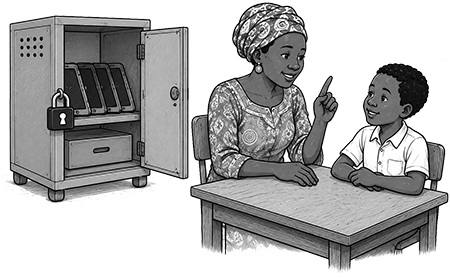
Assistive technologies such as tablets, laptops, Braille devices, and communication tools can be expensive and vulnerable to theft or damage, which means a requirement for physical protection such as:
- Asset tagging or engraving
- Lockable storage cabinets
- Signed usage logs
- Secure charging stations
- Remote lock or remote wipe capabilities
Schools should also plan for:
- Safe transportation
- Device tracking
- Repair and replacement procedures
Learner safety and online protection
Safety is not only about protecting devices and data. It is also about protecting learners while using digital technologies. Children and young people with disabilities may face increased risks related to:
- Online bullying
- Harassment
- Exploitation
- Grooming
- Unsafe online content
Schools should create safe and supportive digital learning environments.
Safe digital learning environments
For younger learners and vulnerable users, schools may prefer systems that provide controlled and moderated access to digital content, such as:
- Restricted educational platforms
- Safe search settings
- Content filtering
- Limited access to external applications
Schools should also ensure that:
- Learners know how to report problems
- Teachers can recognize signs of online distress
- Families understand basic digital safety practices
Building awareness and digital citizenship skills is an important part of inclusive and safe technology use.
Balancing accessibility and security
Security measures should never create unnecessary accessibility barriers.
Here are a few examples:
- Security tools should remain accessible to screen readers
- Authentication systems should consider diverse user needs
- Safety procedures should support independent participation
Inclusive security means designing systems that are both safe and accessible.
Checklist and practices
Data protection:
- Treat learner information as sensitive personal data
- Limit data collection to the necessary information
- Store learner data securely
- Ensure data can be deleted when no longer needed
- Include clear data protection requirements in contracts
Procurement and suppliers:
- Ask suppliers where data is stored
- Verify security and privacy practices
- Prefer technologies with built-in encryption and automatic updates
- Avoid unnecessary data collection and tracking
- Require clear after-sales and security support
Cybersecurity:
- Use secure-by-design technologies
- Keep systems updated regularly
- Use strong passwords and access controls
- Minimize complicated manual security settings
- Train staff on basic cybersecurity practices
Physical security:
- Use asset tags or engravings
- Store devices securely
- Maintain usage and inventory logs
- Plan for theft, damage, and repairs
- Use remote lock or wipe features when available
Learner safety:
- Use safe search and content filters
- Support moderated and age-appropriate learning environments
- Teach digital safety and responsible online behavior
- Encourage reporting of online problems
- Recognize signs of cyberbullying or online distress
Remember:
- Accessibility, privacy, and security must work together
- Learner safety includes both digital and physical environments
- Data should only be used for educational and accessibility purposes
- Inclusive technologies should also support inclusive security practices
- Strong planning and awareness reduce long-term risks
Links and references
- Access Now – Strengthening data protection in Africa: Key issues for implementation
- African Union Convention on Cyber Security and Personal Data Protection – Malabo Convention
- Ayalew, Y. E., Verdoodt, V., & Lievens, E. (2024). General Comment No. 25 on Children’s Rights in Relation to the Digital Environment: Implications for Children’s Right to Privacy and Data Protection in Africa. Human Rights Law Review, 24(3), ngae018.
- Children with Disabilities and Online Safety (UNICEF website)
- Lallie, H. S., Thompson, A., Titis, E., & Stephens, P. (2025). Analysing Cyber Attacks and Cyber Security Vulnerabilities in the University Sector. Computers, 14(2), 49.
- Regulation (EU) 2016/679 – General Data Protection Regulation (GDPR)
- Shao, D., Ishengoma, F., Nikiforova, A., & Swetu, M. (2025). Comparative analysis of data protection regulations in East African countries. Digital Policy, Regulation and Governance, 27(4), 486–501.
- UNICEF. (2023). Child Protection in Digital Education: Policy Brief.
Next page: Monitoring and evaluation