


Most gaming tournaments especially E-sports are designed around the needs of players without disabilities. Players with disabilities either stay away or have to ask for special arrangements to take part. The Over the barriers Accessible gaming tournament as a concept and event has evolved alot over the years. Over the Barriers (Esteet nurin in Finnish) began in November 2022 as an accessible gaming event at Paidia, the gaming space at Nokia Arena in Tampere Finland. We organised it together with SES Special eSports as part of the Tampere higher education community’s accessibility theme week, and people could watch it live on Yle Areena, the Finnish public broadcaster’s streaming service. In 2023 the event grew to two days. One day covered accessible culture through talks and panel discussions. The other covered gaming: a Rocket League tournament played on adaptive controllers and open to everyone, and the finals of the Paidia Open, a Special eSports competition. Special eSports is a form of e-sports developed in Finland in 2019 for people with intellectual disabilities, where players control games with body movements, so fine motor skills are not needed. After the 2023 event, the Over the Barriers game accessibility exhibition opened at the Vapriikki museum in Tampere. It ran from December 2023 to March 2024, with weekly talks on game accessibility. In 2024 the event returned to Paidia. It was free and open to everyone, and it included Paidia Open qualifiers and a final, a shadow theatre show, a concert by Puuwillaorkesteri (a band of musicians with intellectual disabilities), and a quiet room where people could take a break from noise and crowds. In 2025, the fourth edition, we took the next step and gave the Xbox Adaptive Controller to every player.
This article describes how we planned and ran that event. We wrote it for people who have never attended or organised one of our tournaments or people who just want to compare notes and see how they can adopt some of our ideas and blend them into their own events. By the end of this article, you should understand what happens at the event, why we made the choices we made, and how you could plan a similar event from scratch. We also describe what went wrong and how our mistakes taught us as much as our successes.
Two members of the organising team wrote this account. One has organised the event for four years in a row and holds most of the knowledge about how it runs. The other organised it for the first time in 2025. Throughout the planning, we both kept notes guided by the same set of questions: what worked, what needed improving, and what we learned about the space, the participants, marketing, volunteers, streaming, and equipment.
Why accessible tournament?
To lay the foundation let us first explain how things currently go especially in this niche space of competitive computer gaming, often called e-sports. It comes with rules about what equipment players may use and many tournaments ban assistive technology, macros (shortcuts that trigger several actions with one button), or controls other than the standard controller. Organisers usually defend these rules in the name of fair play. But the same rules also decide who gets to show their skill. Industry estimates suggest that around one in five gamers has a disability, and standard rules leave many of them out. Obviously it would be erroneous to think that all the 1 in 5 would have ended up playing professiona E-sports anyways so why should we care? There is a whole body of literature that expands on this and why it is important to have inclusive communities but at the risk of oversimplification let me pose a counter question: wouldnt it be nice to have a world where we dont even have to have this discussion in the first place and everyone would play when they want to play?
When we asked ourselves who decides what skill looks like, we found no single authority. Most rules exist because earlier tournaments had them. Organisers often worry that allowing new forms of play, such as eye-tracking or AI-assisted inputs, would make past achievements worth less. The result is that each event copies the limits of the one before it.
One response has been to run separate tournaments for players with disabilities, sometimes called para-esports. When these events are designed with care, they make disabled players visible and celebrate them. But separate spaces rarely change the mainstream. The Paralympics are a useful comparison: they have raised the profile of disabled athletes, but they have had limited effect on everyday sport. We asked a different question. Instead of creating a separate space, what happens if the main event is accessible from the start?
Others have worked in this area too. Examples include Logitech G’s Adaptive e-sports Tournaments, the charity AbleGamers, and a Tekken tournament for senior citizens in Japan. The City of Espoo in Finland has published a guide called Esports for All, which covers what to think about when running an accessible tournament. If you are planning your own event, that guide works well alongside this article.
The big idea: one controller for everyone
The Xbox Adaptive Controller is a flat controller with two large buttons and a row of ports. You can plug in extra buttons, switches, and joysticks, and you can change what each input does. This lets each player arrange the controls to suit their own body. It is also sold as an ordinary consumer product, not as specialist medical equipment. These features are why we chose it. Our partnership with Microsoft was a factor, but it was not the main reason.
Picture source: https://www.microsoft.com/en-us/d/xbox-adaptive-controller/8nsdbhz1n3d8
Earlier editions of our tournament focused on making the event accessible to players with disabilities. In 2025 we changed the approach. We gave the adaptive controller to every player, whether they had a disability or not. This is an example of universal design: one setup that works for as many people as possible, instead of special arrangements added for a few.
This choice had three main effects:
- It put experienced and new players on a more equal footing. Most players had never used the controller before, so everyone started from the same place.
- It changed what counted as skill. Muscle memory on a standard controller mattered less. The ability to adapt, experiment, and solve problems mattered more.
- It reduced stigma. Nobody stood out for using assistive technology, because everyone was using it. The competition stayed real; it simply rewarded different abilities.
There is a trade-off. A single standard controller is still a single standard. A player whose needs call for a different device becomes the new exception. A change that opens the event to one person can close it to another. Designing for everyone means choosing whose access comes first, and those choices can conflict. If you take this approach, be open about these trade-offs rather than hiding them.
How the event has changed over four years
Over the Barriers (Esteet nurin in Finnish) began in November 2022 as an accessible gaming event at Paidia, the gaming space at Nokia Arena in Tampere. We organised it together with SES Special eSports as part of the Tampere higher education community’s accessibility theme week, and people could watch it live on Yle Areena, the Finnish public broadcaster’s streaming service. In 2023 the event grew to two days. One day covered accessible culture through talks and panel discussions. The other covered gaming: a Rocket League tournament played on adaptive controllers and open to everyone, and the finals of the Paidia Open, a Special eSports competition. Special eSports is a form of e-sports developed in Finland in 2019 for people with intellectual disabilities, where players control games with body movements, so fine motor skills are not needed. After the 2023 event, the Over the Barriers game accessibility exhibition opened at the Vapriikki museum in Tampere. It ran from December 2023 to March 2024, with weekly talks on game accessibility. In 2024 the event returned to Paidia. It was free and open to everyone, and it included Paidia Open qualifiers and a final, a shadow theatre show, a concert by Puuwillaorkesteri (a band of musicians with intellectual disabilities), and a quiet room where people could take a break from noise and crowds. In 2025, the fourth edition, we took the next step and gave the Xbox Adaptive Controller to every player.
The 2025 tournament was the fourth edition. The first editions set up the basic idea of an accessible gaming tournament and built a working relationship with Microsoft as a partner. By the fourth year, some parts were well understood: the general planning timeline, the venue, and the partnership. Because those parts ran smoothly, we had more energy for new things, such as a structured marketing plan and the adaptive-controller-for-everyone format.
Growing ambition also brought new problems. The 2025 event was larger and more complex, and what had worked in simpler years did not always carry over. Each edition has been its own learning experience. Past knowledge helps, but you still need to adapt to the conditions of each new year.
The biggest change has been in how the event thinks about accessibility. It has moved from accommodation (adjusting things for players with disabilities) towards universal design (building one event that attempts to work for everyone).
Building the team
The event runs on a small core team that stays the same from year to year. Around this core, a group of volunteers joins for each edition, and that group changes depending on when planning happens.
In 2025 we recruited volunteers through an internal mailing list at Tampere University. Seven people replied to the first call and joined a Microsoft Teams group. From then on, we handled all coordination, task assignment, and meeting scheduling in that group.
Between recruitment and the event, many of these volunteers dropped out. Some changed their minds, some got busy with other things, and some were no longer students. From this we learned four things:
- Recruit in several waves, not one. A single early call is not enough when planning takes months.
- Run an extra round of recruitment close to the event date. People can predict their availability better then, so their commitments are more reliable.
- Keep volunteers involved during the planning period with regular updates, so they feel part of the project before the event happens.
- Give every task a clear owner, and agree how tasks are handed over if someone leaves.
Relying only on volunteers makes an event fragile. Right now, most of the knowledge that keeps our event running sits with very few people. If one of them leaves or they are busy, clearly that becomes a bottleneck. A written record of how the event works would protect against this, and this article is partly an attempt to create one.
Based on our experience, these roles need a named person and are key to making sure that you have publicity and participants:
- Marketing and social media, working from a content plan.
- Player onboarding: arranging the pre qualifications, recruitment, helping players sign in and get set up on the consoles on the day.
- Streaming and audio-visual equipment: at least two people trained before the event day.
Choosing a venue
We held the event in a space at Paidia, in the Nokia Arena, the good thing with the venue was that we already knew it was quiet and accessible. We chose it because we had used it before. If you are starting from scratch, visit possible venues in person and check how people enter the building, how they move around inside it, and whether there is a quiet space people can use to rest.
On the day, we relied mostly on the venue’s own technical staff to run the equipment. This worked, but it was a risk. If the staff had been unavailable, we might not have been able to run the stream or other technical parts of the event. Train some of your own volunteers on the venue’s equipment in advance.
Think about the layout. Our room was large, so it could feel empty when fewer people came than expected. Plan where seating, screens, and the audience area go so the room feels lively even with a smaller crowd. We also had the streaming desk, the player stations, and the audience in the same room. As a result, noise from the commentary sometimes made it harder for players to concentrate. You can solve this by putting these areas in separate spaces or by giving players headphones.
Language is part of the space too. Our live commentary was in Finnish and could be heard across the whole room. Anyone who did not understand Finnish could not follow the action through the commentary. Consider commentary in more than one language, subtitles on the screens, or at least a short summary in other languages, so everyone in the room can follow what is happening and this depends on your knowledge of the demographics and the expectations you set for the attendees as well.
Choosing the game and setting up the equipment
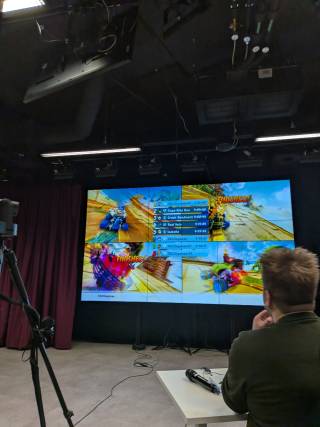
The tournament used Crash Team Racing Nitro-Fueled, a kart racing game. We chose it because it works well with the adaptive controller. It rewards timing and decision-making more than rapid button-pressing and fine motor control. When you choose a game, ask what abilities it rewards and whether players can succeed with the controller you plan to use.
Setting up took longer than we expected. Signing each player into a separate user profile on the console for multiplayer play caused delays at the start of the event. Two things would have helped: a volunteer whose only job was player onboarding, and a sign-in procedure that we had tested before the day.
Getting the word out
Marketing started when we announced the theme and the date. We designed a content plan to build awareness in stages:
- First, a Save the Date post and a post introducing the Xbox Adaptive Controller.
- Next, posts with registration details and instructions for the qualifying rounds.
- Closer to the event, countdown posts and behind-the-scenes clips to build excitement.
- On the day, live coverage of the matches.
- Afterwards, a thank-you post with community photos, figures about the event’s impact, and thanks to the players.
We promoted the event on LinkedIn, in presentations and classes at the university, through a Facebook event, and with posters on campus notice boards. Promoting the event in person at presentations and classes raised awareness well. The content plan, although only partly carried out, gave us a clear way to think about what to say and when.
Much of the marketing did not go to plan. We did not start with a clear overall marketing plan to guide the content plan. We published only three of the ten planned posts. We relied heavily on LinkedIn without checking whether our audience used it. Our channels did not share or repeat each other’s posts. Even people close to us did not know enough about the event. We also had no way to measure how well our posts were doing, and we never reviewed the plan during the campaign. Without targets and regular check-ins, we could not notice problems and change course. This was one of the main reasons for low attendance.
Coordination also caused problems. Some posts, such as the game reveal and the qualification details, depended on decisions the team had not made early enough. When the information finally arrived, the marketing volunteers had to fit design and posting around their own commitments, and some deadlines were missed. We had no clear guidelines for posting, which led to some misunderstandings and some wrong information being shared. We translated some posts into Finnish, but not consistently.
This was the first year we used a structured marketing plan, so these were first-attempt problems. The main lesson is this: we made the gameplay accessible by default, but we did not give marketing the same care. Our promotion used one main platform, mostly one language, and few formats besides posters. Accessible outreach needs planning for language, format, and channel from the start. Publish in several languages and formats, including audio and video. If people cannot find or understand your promotion, they are excluded before the event even begins.
The programme
The event ran over two days.
Day one: qualification and setup. The day before the main event, we held a five-hour qualification round at the venue. At the same time, we set up the space. This meant putting up banners, instructions, and signs; connecting the consoles to the screen; testing the live stream; preparing the slide deck; and checking that everything we needed was there. We also checked the building for access problems and made sure the information and directions for getting into the building were clear and easy to see. We finished with general housekeeping tasks.
Day two: the main event. The morning started with a final qualification round. Next came a panel discussion, followed by lunch. The main tournament was built as a live stream. It opened with a pre-show of highlights from past years and introductions from our partners, followed by the main tournament rounds with live commentary. The day was planned to end with a wrap-up after the final match, a trophy ceremony for the winners, and a group photo.
Streaming and commentary
We streamed the event mainly in Finnish. We could have offered other languages through live translation, transcription, or interpreters. This is the clearest example of our access-by-default idea not reaching every part of the event. We applied it to the controller, but not to the commentary. Anyone who did not understand Finnish missed out on the live experience. Plan languages for the stream from the very beginning, not as an afterthought.
As with the venue, our streaming setup depended on the venue staff’s knowledge of the equipment. It worked, but we would not have been able to run the stream ourselves if they had been unavailable. Training at least two volunteers on the streaming and audio-visual equipment before the event reduces this risk.
Who came and what it felt like
Fewer people took part than we had hoped. We think several factors combined. The unfamiliar controller may have put off some competitive gamers. Our marketing did not reach enough people early enough. And the event appeals to a small group: people willing to try an unfamiliar controller in a competitive setting.
The players who did come were open-minded and happy to experiment. Because nobody was used to the controller, the atmosphere was relaxed and supportive, with much less pressure than at a typical e-sports event. Players helped each other work out the hardware. The mood was one of discovering things together rather than one person dominating.
To make it easier for people to take part in future, we suggest two things. First, offer practice sessions before the event so players can get used to the controller. Second, recruit players through gaming communities and disability organisations, not only through the university mailing list.
Planning your own event
Many of the challenges we encountered such as volunteer coordination, communication, scheduling pressure, and technical readiness, are common to any e-sports event. They are not caused by accessibility. In our experience, if you plan for accessibility from the start, an accessible tournament is no harder to run than any other tournament. The following nine guidelines come from four years of running this event. Treat them as things to consider, not fixed rules.
- Build accessibility in from the start. Let access needs guide your decisions about the venue, equipment, communication, schedule, stream, marketing, and recruitment, rather than fixing things later.
- Use universal design in the gameplay. Make adaptive equipment the standard for all players. This makes assistive technology normal and rewards adaptability and learning instead of experience with a standard controller.
- Choose a venue that supports physical, sensory, and cognitive access. Look for a space that is accessible, familiar, suitable for both players and audience, and has room for a quiet area.
- Plan sound and language. Make sure game audio, commentary, and the stream do not overwhelm people with noise or shut out people who speak other languages.
- Plan communication in several languages and formats from the start. Use subtitles, interpretation, transcription, and a mix of text, audio, video, and images, both at the venue and online.
- Make all marketing accessible by default. Inaccessible promotion keeps people out before the event begins and undoes accessibility work elsewhere.
- Build your team’s skills. Train organisers and volunteers to run the technical systems, such as the stream and audio-visual setup.
- Give a named person each task that affects access, such as player onboarding and technical support, so that no single point holds up play.
- Make it easy to join, and learn from every edition. Offer chances to try the equipment before the event, and use what you learn each year to improve the next.
A suggested planning order. Based on what we have described, a first-time organiser could work through the event in this order:
- Decide your accessibility principles and the format of the tournament.
- Secure your partners, equipment, and venue, and visit the venue to check access.
- Choose a game that suits your controller and the abilities you want to reward.
- Build the core team, recruit the first wave of volunteers, and give each role a named owner.
- Write a marketing plan with targets, several languages and formats, and regular check-ins. Make the decisions that marketing depends on, such as the game and the qualification rules, early.
- Plan the stream and commentary, including which languages you will offer and how.
- Recruit a second wave of volunteers closer to the date, and train at least two people on the streaming and audio-visual equipment.
- Offer practice sessions so players can try the controller, and test the console sign-in procedure.
- Hold a setup and qualification day before the main event.
- Run the main event.
- Afterwards, thank the participants, ask players and spectators about their experience, and write down what you learned for next year.
Closing thoughts
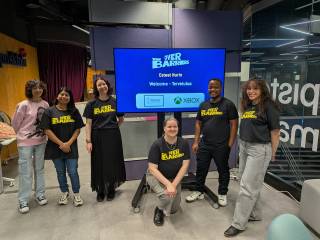
Running the 2025 tournament showed us that an accessibility-first e-sports event can work in practice and still be a real competition. Giving every player the same adaptive controller made players more equal, made assistive technology ordinary, and rewarded adaptability over experience with standard hardware. It also showed us that accessibility does not stop at the controller. The venue, the language, the marketing, the stream, and the way players are recruited all decide who can take part. If you leave any of these out, you create barriers, even when the gameplay itself is inclusive.
Accessibility is often treated as an extra to add late in planning. Our experience suggests it works better as the starting point. We hope this account helps you start your own event with that in mind. finally we would like to specially appreciate the volunteers who helped make the 2025 edition a success. This article has been adapted from a manuscript which will likely be published in future, if you have any questions or would like to partner with the Tampere Accessibility Unit you can contact us
Kommentit